I needed a paid tier on a free tool: $9 for a pool of 100 extra calls. No subscription. No account system. No monthly plan. A person pays once, comes back to the tool, and the tool knows they have credits.
The whole thing runs on a Cloudflare Worker. I could have reached for an SDK, and Stripe does have an official stripe-node Cloudflare Worker template. For this tiny flow, I chose not to. The only Stripe work I needed server-side was webhook verification, fulfillment, and one optional Checkout Session lookup.
That made the interesting part very specific: can you verify a Stripe webhook in a Cloudflare Worker with no SDK, using only Web Crypto?
Yes. And once you do it by hand, the shape of webhook security gets much less mystical.
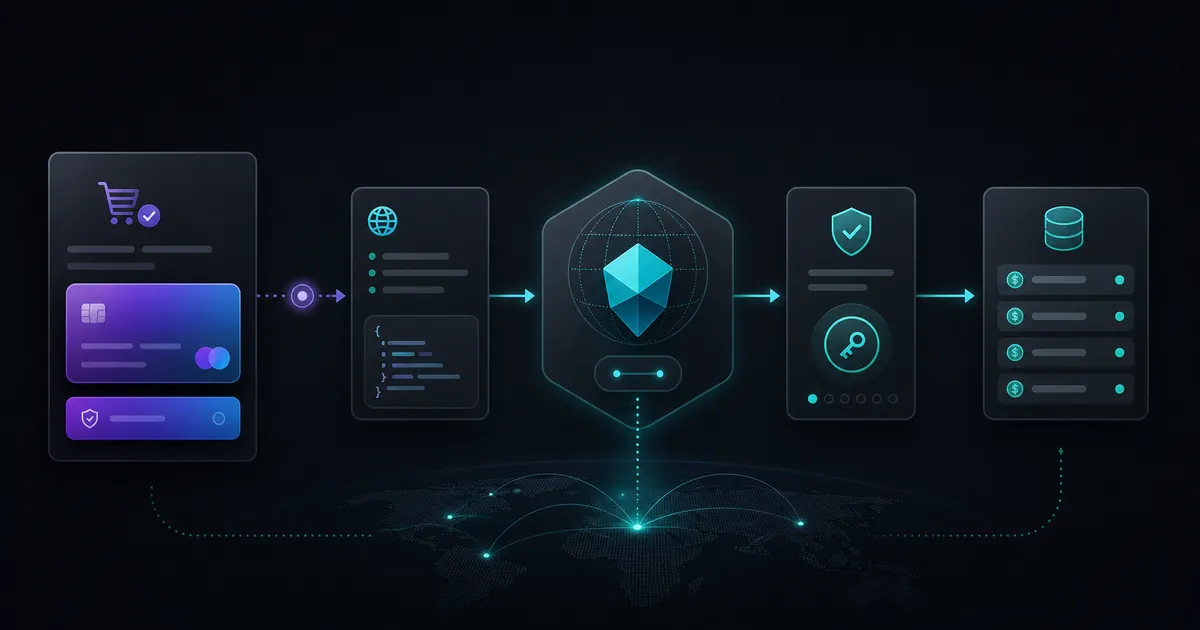
The flow
- The customer clicks a Stripe Payment Link. Stripe hosts checkout. I never touch card data.
- Stripe sends
checkout.session.completedto my Worker. The Worker verifies the signature before trusting the event. - The Worker writes credits to KV. I key the entitlement by normalized email and record the session ID for idempotency.
- The customer redirects back to the tool. The return route can use the Checkout Session ID to smooth the handoff, but the webhook remains the source of truth.
That is enough infrastructure for a small one-time unlock. Not every product needs accounts before it has revenue.
The SDK question in 2026
A lot of older advice says "Cloudflare Workers cannot use Stripe's SDK." That is not the full picture anymore. Workers have grown, Stripe has examples, and there are ways to use stripe-node in a Worker environment.
But "can use the SDK" and "needs the SDK" are different questions.
For this flow, an SDK would mainly do two things: verify the webhook and call the Checkout Session API. The Checkout Session lookup is a plain HTTPS request. The webhook verification is HMAC-SHA256. Cloudflare Workers expose the Web Crypto API through crypto.subtle, and Cloudflare documents HMAC support there.
So I kept the worker small. No dependency install. No Node compatibility flag just for one endpoint. No billing abstraction for a one-price unlock.
Use the SDK if your billing logic is complex. Subscriptions, invoices, tax, customer portal flows, Connect, metered billing, and retries all deserve heavier tooling. This article is for small Payment Link flows where webhook verification is the sharp edge.
What Stripe signs
Stripe includes a Stripe-Signature header with a timestamp and one or more signatures. Their manual verification docs describe the signed payload as:
timestamp + "." + raw_request_bodyYou compute an HMAC-SHA256 signature using your webhook endpoint secret, then compare it to the v1 signature from the header. If it matches, the request came from someone holding that endpoint secret. If it does not, you reject the request before parsing or fulfilling anything.
The raw body matters. Stripe's troubleshooting docs are blunt about this: the request body has to be the body string Stripe sent, in UTF-8, without changes. If you call request.json() first and later rebuild the string, you are no longer verifying the same payload.
Manual Stripe webhook verification with Web Crypto
This is the core verifier. It handles multiple v1 signatures, rejects old timestamps, and uses crypto.subtle.verify instead of comparing hex strings manually.
const encoder = new TextEncoder();

function hexToBytes(hex) {
  if (!/^[0-9a-f]+$/i.test(hex) || hex.length % 2 !== 0) {
    throw new Error("Invalid hex signature");
  }

  const bytes = new Uint8Array(hex.length / 2);
  for (let i = 0; i < bytes.length; i++) {
    bytes[i] = parseInt(hex.slice(i * 2, i * 2 + 2), 16);
  }
  return bytes;
}

function parseStripeSignature(header) {
  const values = { t: null, v1: [] };

  for (const part of header.split(",")) {
    const [key, value] = part.split("=", 2);
    if (key === "t") values.t = value;
    if (key === "v1" && value) values.v1.push(value);
  }

  return values;
}

async function verifyStripeWebhook(rawBody, signatureHeader, endpointSecret) {
  if (!signatureHeader) return false;

  const { t, v1 } = parseStripeSignature(signatureHeader);
  if (!t || v1.length === 0) return false;

  const timestamp = Number(t);
  if (!Number.isFinite(timestamp)) return false;

  const age = Math.abs(Math.floor(Date.now() / 1000) - timestamp);
  if (age > 300) return false;

  const key = await crypto.subtle.importKey(
    "raw",
    encoder.encode(endpointSecret),
    { name: "HMAC", hash: "SHA-256" },
    false,
    ["verify"]
  );

  const signedPayload = encoder.encode(t + "." + rawBody);

  for (const signature of v1) {
    const ok = await crypto.subtle.verify(
      "HMAC",
      key,
      hexToBytes(signature),
      signedPayload
    );

    if (ok) return true;
  }

  return false;
}
The 5-minute window matches Stripe's default tolerance in their official libraries. It is not decorative. It limits replay attacks where someone captures a valid webhook and tries to send it again later.
The Worker route
The handler order is the whole trick: read raw text, verify, parse JSON, fulfill.
export default {
  async fetch(request, env) {
    const url = new URL(request.url);

    if (url.pathname === "/stripe/webhook" && request.method === "POST") {
      return handleStripeWebhook(request, env);
    }

    return new Response("Not found", { status: 404 });
  },
};

async function handleStripeWebhook(request, env) {
  const rawBody = await request.text();
  const signature = request.headers.get("stripe-signature");

  const verified = await verifyStripeWebhook(
    rawBody,
    signature,
    env.STRIPE_WEBHOOK_SECRET
  );

  if (!verified) {
    return new Response("Bad signature", { status: 400 });
  }

  const event = JSON.parse(rawBody);

  if (event.type === "checkout.session.completed") {
    await fulfillCheckoutSession(event.data.object, env);
  }

  return Response.json({ received: true });
}
This is also where you keep your endpoint boring. Stripe retries webhook delivery when your endpoint fails. If fulfillment is idempotent, retries are fine. If fulfillment blindly adds credits every time the same event arrives, retries become expensive.
Writing credits to KV safely
For my use case, KV was enough: one email maps to a small credit record. Cloudflare KV is designed for global low-latency key-value reads and exposes simple get and put methods through Worker bindings.
The part that matters is idempotency. Store the Stripe Checkout Session ID and ignore repeats.
async function fulfillCheckoutSession(session, env) {
  const email =
    session.customer_details?.email ||
    session.customer_email;

  if (!email) {
    throw new Error("Checkout Session did not include an email");
  }

  const normalizedEmail = email.trim().toLowerCase();
  const sessionKey = "stripe-session:" + session.id;
  const creditKey = "credits:" + normalizedEmail;

  const alreadyFulfilled = await env.CREDITS.get(sessionKey);
  if (alreadyFulfilled) return;

  const existing = await env.CREDITS.get(creditKey, "json");
  const currentCredits = existing?.credits || 0;

  await env.CREDITS.put(
    creditKey,
    JSON.stringify({
      email: normalizedEmail,
      credits: currentCredits + 100,
      lastSessionId: session.id,
      updatedAt: new Date().toISOString(),
    })
  );

  await env.CREDITS.put(
    sessionKey,
    JSON.stringify({
      email: normalizedEmail,
      fulfilledAt: new Date().toISOString(),
    })
  );
}
For a busier product, I would reach for D1 or Durable Objects to get stronger transactional behavior. For a low-volume $9 unlock, KV is pragmatic. The edge case I care about is duplicate webhook delivery, and the session marker handles that.
The redirect back from Payment Links
Stripe Payment Links can redirect customers after payment and include the Checkout Session ID in the return URL. Stripe's fulfillment docs show the {CHECKOUT_SESSION_ID} placeholder for hosted Checkout and Payment Links.
That gives you a better return experience:
https://example.com/after-checkout?session_id={CHECKOUT_SESSION_ID}On the return route, you can look up the session directly with the Stripe API using fetch:
async function retrieveCheckoutSession(sessionId, env) {
  const response = await fetch(
    "https://api.stripe.com/v1/checkout/sessions/" + encodeURIComponent(sessionId),
    {
      headers: {
        Authorization: "Bearer " + env.STRIPE_SECRET_KEY,
      },
    }
  );

  if (!response.ok) {
    throw new Error("Could not retrieve Checkout Session");
  }

  return response.json();
}
I still treat the webhook as the source of truth. The redirect page is for UX. The webhook is for fulfillment. That distinction matters because users can open return URLs manually, refresh pages, share links, or land there before async systems have fully settled.
Testing it for real
I tested the flow with live-mode purchases, not just test mode. Test mode is useful, and I used it first. But for a payment unlock, I wanted to watch real money move, a real webhook fire, real signature verification pass, and real credits land in the store.
Two $9 purchases was a cheap QA budget.
The production checks were simple:
- Payment Link completes successfully.
- Webhook endpoint receives
checkout.session.completed. - Signature verification passes only with the live endpoint secret.
- Credits are written once for the session.
- Refreshing the return page does not add credits again.
- Replaying the same webhook does not double-fulfill.
The constraint was useful because it made the security step visible. Webhook verification is not Stripe magic. It is signed bytes, a timestamp, and a secret.
When I would not do it this way
I like this pattern for tiny one-time unlocks, early tools, internal products, and narrow paid features. I would not use it as-is for subscription lifecycle management, invoice history, complex entitlements, team accounts, tax handling, or anything where billing state becomes a product surface.
For those, use the official SDK path and design the data model properly. Dependencies are not moral failures. They are just tradeoffs. In this case, the tradeoff favored a small Worker and a very explicit verification function.
Need a small paid tool or edge workflow built cleanly?
I build technical SEO tools, custom Workers, site rescue workflows, and small systems that avoid unnecessary platform weight.
FAQ
Can you verify Stripe webhooks in a Cloudflare Worker without the Stripe SDK?
Yes. Read the raw request body, extract the Stripe-Signature header, build timestamp.rawBody, and verify the v1 HMAC-SHA256 signature with crypto.subtle.verify.
Do Cloudflare Workers support the Stripe SDK?
There is an official stripe-node Cloudflare Worker template, so the SDK path exists. This article is about the no-SDK path for a small Payment Link flow.
Why does raw request body matter for Stripe webhooks?
Stripe signs the exact body it sends. Parsing and re-stringifying can change whitespace, encoding, or object order. Read request.text(), verify that string, then parse it.
Is KV enough for Stripe credits?
For a low-volume one-time credit pool, yes, if you make fulfillment idempotent. For high-volume billing state or transactional requirements, use D1, Durable Objects, or a database built for that job.