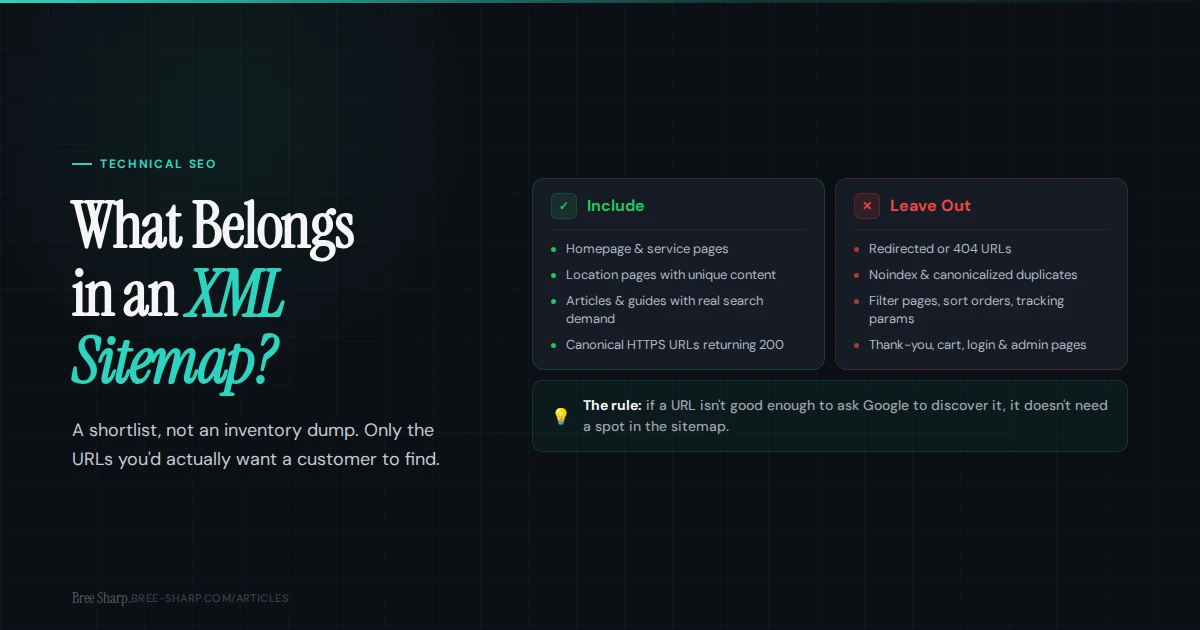
A useful XML sitemap is curated. It should point search engines toward the canonical URLs you want considered for search, not every URL a CMS, plugin, or tracking parameter can create.
The rule of thumb
Put URLs in your XML sitemap when they are canonical, indexable, useful, and meant to appear in search results. Leave URLs out when they are blocked, redirected, duplicate, private, or not supposed to appear in search. A sitemap is a shortlist, not an inventory dump.
Google recommends including the URLs in your sitemap that you want to see in Google search results.
Include these URLs
- Your homepage and main service pages.
- Location or service-area pages that are unique enough to stand on their own.
- Important articles and guides that answer real search demand.
- Case studies, portfolio pages, or proof pages you want discoverable.
- Canonical HTTPS URLs that return a 200 status code.
- Recently updated URLs with accurate
lastmoddates when your platform can maintain them cleanly. - Important orphan pages you are trying to surface while you fix the internal linking problem.
Leave these URLs out
- URLs that redirect to another URL.
- 404, soft-404, or server-error URLs.
- Noindex pages.
- Canonicalized duplicates that point to a different URL.
- Internal search results, filtered pages, sort orders, and tracking-parameter versions.
- Thank-you pages, cart pages, login pages, admin paths, and private pages.
- Low-value placeholder pages that are not intended for search.
If a URL is not good enough to ask Google to discover it, it probably does not need a VIP pass in the sitemap.
What the extra fields actually mean
Most generated XML sitemaps include more than just the URL. The two fields people overthink are priority and changefreq. Google says it ignores both. Setting every page to priority 1.0 will not create a crawl boost. It mostly creates a confident-looking lie.
lastmod is different. Google may use it when it is consistently accurate and tied to meaningful page changes. That means changes to the main content, structured data, or important links, not a plugin save, theme tweak, footer copyright update, or CMS hiccup that touched every URL at once.
If your CMS updates lastmod every time someone breathes near the backend, you are better off fixing that behavior than feeding Google fake freshness signals.
Sitemap indexes and size limits
A single sitemap file can include up to 50,000 URLs and must stay under 50MB uncompressed. If a site is bigger than that, split the URLs into multiple sitemap files and use a sitemap index file to point search engines to the set.
Sitemap indexes are also useful before you hit the limit. Large sites often separate pages, posts, products, categories, images, videos, or news into different child sitemaps. That makes errors easier to diagnose in Search Console because you can see which section of the site is causing the problem.
For a local service business, one clean sitemap is usually enough. For ecommerce, directories, publishers, and big content libraries, a sitemap index is normal housekeeping.
How to tell Google where it is
Once the sitemap is clean, make it findable. Add a Sitemap: line to robots.txt using the full absolute URL, such as Sitemap: https://example.com/sitemap.xml. That declaration is not tied to a specific user-agent group; major crawlers can use it as a pointer to the sitemap or sitemap index.
Then submit the sitemap in Google Search Console. That gives you reporting Google will not show from robots.txt alone: whether the file was read, when it was last fetched, how many URLs were discovered, and whether Google found errors.
Clean the sitemap first, declare it in robots.txt, submit it in Search Console, then monitor the submitted sitemap report after major launches, migrations, and content pushes.
Image, video, and news sitemaps
Plain XML sitemaps are for URLs. Google also supports sitemap extensions for images, videos, news, and localized versions of pages. These can help Google discover media or special content that is important but harder to find through normal crawling.
- Image sitemaps: useful when image search visibility matters or images are loaded in a way crawlers may not easily discover.
- Video sitemaps: useful for pages where video is a primary asset and Google needs thumbnail, title, description, or player details.
- News sitemaps: useful for publishers with time-sensitive news content, not normal service-business blog posts.
- Localized page annotations: useful when multilingual or regional variants need clearer discovery relationships.
Most small business sites do not need every specialty sitemap on day one. But if the business depends on visual work, video content, product media, or publishing velocity, the default page sitemap may not be the whole story.
The common sitemap conflicts
| Conflict | Why it matters | Fix |
|---|---|---|
| Sitemap lists redirected URLs | Search engines waste time fetching outdated addresses. | List the final destination URL instead. |
| Sitemap lists noindex URLs | You are asking Google to discover pages that also say not to index them. | Remove them from the sitemap or remove noindex if they should appear in search. |
| Sitemap lists HTTP URLs | The canonical site is usually HTTPS now. | Use the final HTTPS canonical URLs. |
| Sitemap lists noncanonical duplicates | The sitemap and canonical tag disagree. | Keep only the preferred canonical URL. |
How often should you check it?
Check the sitemap after launches, migrations, redesigns, URL cleanup, major content pushes, and platform/plugin changes. For a small service business site, that usually means a quick check whenever new important pages go live and a fuller review every quarter.
The sitemap will not make weak pages rank. It can help search engines discover the intended URLs and give you a cleaner submitted set to monitor for old, broken, or duplicate versions.
FAQ
Should every page be in my XML sitemap?
No. Your sitemap should include the pages you want search engines to discover and consider for search results. Utility, duplicate, blocked, redirected, and noindex pages usually do not belong there.
Should noindex pages be in a sitemap?
Usually no. A sitemap says "please discover this URL," while noindex says "do not show this page in search." Those signals work against each other.
Does a sitemap guarantee indexing?
No. A sitemap helps discovery. Google still evaluates crawl access, canonical selection, duplication, page content, and other indexing signals for each URL.
Does every site need an XML sitemap?
Not always. A small, well-linked site can be discovered without one, but a clean sitemap is still useful for new pages, refreshed content, larger sites, orphan-page cleanup, and Search Console reporting.
How big can one XML sitemap be?
A single sitemap can list up to 50,000 URLs and must be under 50MB uncompressed. Bigger sites should split URLs into multiple sitemaps and use a sitemap index file.
Do priority and changefreq help rankings?
No. Google says it ignores priority and changefreq values. Accurate lastmod dates are more useful, but only when they reflect meaningful page updates.
Where should I submit my sitemap?
Add the sitemap URL to robots.txt with a Sitemap directive and submit it in Google Search Console so you can monitor discovery, fetch status, and sitemap errors.