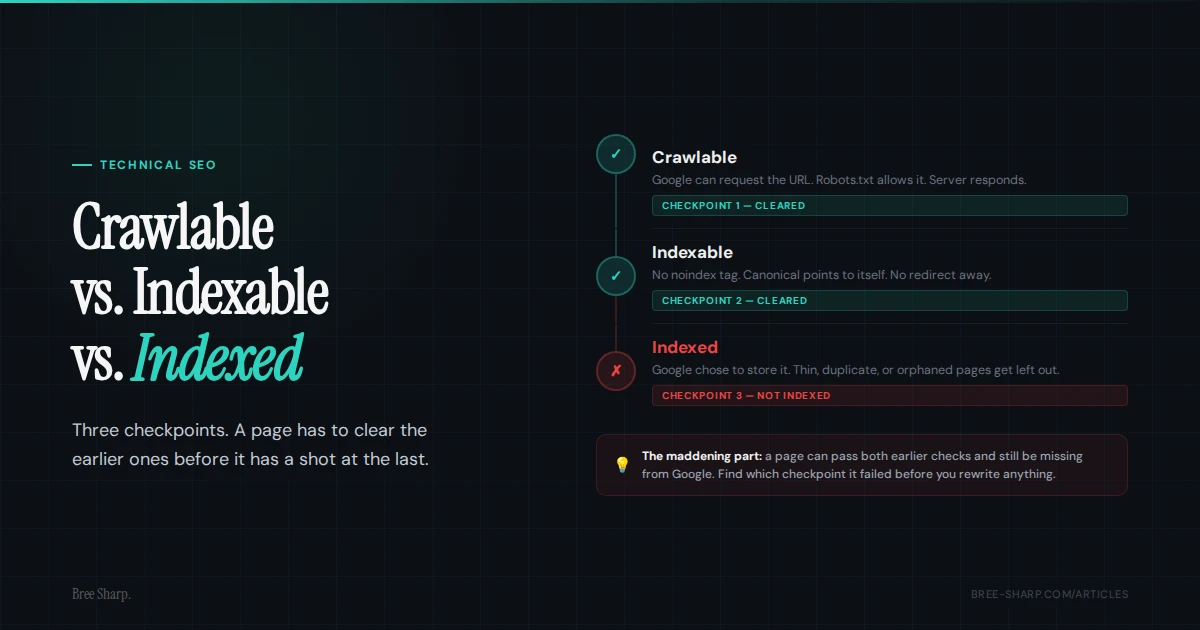
Use these terms as a diagnostic sequence, not a vocabulary quiz. First ask whether the URL can be crawled. Then ask whether it is allowed to be indexed. Then ask whether Google actually chose to store it.
The three checkpoints
Crawlable, indexable, and indexed are three different checkpoints. Crawl access lets Google process the page, indexing directives affect eligibility, and Search Console records whether Google indexed the URL. If a service page is missing from Google, find the failed checkpoint before rewriting it.
| Signal | Plain-English meaning | Common failure |
|---|---|---|
| Crawlable | Search engines are allowed to request the URL. | Robots.txt blocks the page, the server fails, or redirects loop. |
| Indexable | The page can be considered for search results. | A noindex directive excludes it, or a redirect means another URL is the destination. |
| Indexed | Google actually added the page to its search index. | Google selected another canonical, treated it as a duplicate, or has not indexed it yet. |
A page can be crawlable and indexable without being indexed. Google may select another canonical, treat the page as a duplicate, or leave it out of the index for another documented reason.
What crawlable means
A crawlable URL is a URL search engines can request. That sounds basic until a launch goes sideways and the money pages are technically live but quietly fenced off from crawlers. Customers can load the page. Googlebot cannot, or should not, according to the site's crawl-control signals.
Crawlability is mostly about access. Is the URL returning a clean response? Is robots.txt allowing the crawler? Are redirects working? Is the server responding? Can Google fetch the resources it needs to understand the page?
- Robots.txt block: A rule like
Disallow: /services/can keep crawlers away from every service page under that folder. - Sitewide launch block: A leftover
Disallow: /from staging can tell normal crawlers to stay away from the entire site. Common. Very rude. - Redirect problems: A page that redirects through multiple hops, loops, or lands on the wrong URL can waste crawl attention before Google ever evaluates the content.
- Server errors: 5xx responses, timeouts, and intermittent hosting problems make a URL less reliable for crawlers.
- Blocked resources: If important CSS or JavaScript is blocked, Google may not see the page the way a user does.
Start with the URL itself. Check the HTTP status, final destination after redirects, robots.txt permission for Googlebot, and whether the page can be fetched in Google Search Console's URL Inspection tool.
What indexable means
An indexable page is allowed to be considered for search results. Check noindex tags and X-Robots-Tag headers for explicit exclusions, then review redirects and canonicals because they can change which URL Google evaluates or selects.
Indexability answers the question: after Google gets to the page, do its directives allow indexing, and does its canonical signal a different preferred URL?
- Meta noindex: A tag like
<meta name="robots" content="noindex">tells search engines not to show the page in results. - X-Robots-Tag noindex: The same instruction can come from an HTTP header, which is easy to miss if you only look at page source.
- Canonical points elsewhere: A service page that canonicalizes to the homepage signals that the homepage is preferred. Google treats canonical as a hint and may choose a different canonical.
- Redirected URL: If the URL redirects, the original URL is not the page Google is being asked to index.
- Conflicting signals: A URL in the sitemap that also has noindex, is blocked by robots.txt, or canonicalizes elsewhere is sending mixed instructions.
Indexable means eligible. It does not mean accepted.
What indexed means
An indexed page is a page Google has actually stored in its index and can show in search results. When people say, "Google can't find my page," they usually mean this final checkpoint.
A page can be crawlable and indexable and still not be indexed. At that point, read the reason Google recorded, check its selected canonical, and compare the URL with any duplicates before changing the copy.
- Thin or generic content: A service page that repeats generic claims may not establish a distinct purpose or useful difference from similar pages.
- Near-duplicate pages: Ten location pages with swapped city names may be treated as duplicates rather than distinct canonical pages.
- Weak internal links: If no relevant page links to it, the URL has less discovery and site context.
- Orphaned URLs: A URL listed in a sitemap but not linked from the site has discovery help, but little internal context.
- Poor canonical patterns: If several similar URLs compete with each other, Google may choose one and ignore the rest.
- New or weakly linked URL: A newly published page may take longer to crawl and index, especially when internal discovery is limited.
For a small service business, this often shows up as a technically fine page that still reads like a brochure. It has the service name, a phone number, and maybe a few paragraphs, but no proof, no specificity, no local context, no answers to real buyer questions, and no reason to choose that page over the other fifty pages Google already knows.
How Google Search Console statuses map to this
Two Page indexing reasons fit this three-stage model: Discovered - currently not indexed and Crawled - currently not indexed. They describe different points in Google's recorded process, not a final judgment on the page.
| Page indexing reason | Where it fits | Useful next checks |
|---|---|---|
| Discovered - currently not indexed | Google knows the URL exists, but has not crawled it yet. | Review internal discovery, sitemap inclusion, duplicate URL patterns, server reliability, and crawl demand on large sites. |
| Crawled - currently not indexed | Google crawled the page, but did not add it to the index. | Review the selected canonical, duplication, soft-404 signals, internal links, and whether the page answers a distinct search need. |
Discovered - currently not indexed means Google knows the URL but has not crawled it. On a large site, review crawl demand and duplicate URL patterns. On a small site, check internal links, sitemap inclusion, and whether the server responds reliably.
Crawled - currently not indexed means Google crawled the URL but did not add it to the index. Inspect duplication, the selected canonical, soft-404 signals, internal links, and the page's distinct purpose before requesting another crawl.
Why the words matter
If you treat every missing page like an indexing problem, you waste time. A blocked robots.txt rule needs a different fix than a thin service page. A canonical pointing somewhere else needs a different fix than a brand-new page waiting for discovery.
That is why the first question should not be "why is this not ranking?" It should be "where did this URL fall out of the process?" Otherwise you end up polishing a page Google was never allowed to keep in the first place.
- If it is not crawlable: fix access first. Google cannot process the current page content when it cannot fetch the URL.
- If it is crawlable but not indexable: check noindex, canonical, redirects, and HTTP headers.
- If it is indexable but not indexed: look at content quality, internal links, duplication, and whether the page deserves to exist as its own result.
How to diagnose one URL
Start with the exact page, not the whole website. Copy the final canonical URL from the browser and check the signals in this order. This keeps you from treating a crawl problem like a content problem or a content problem like a crawl problem.
- Check the HTTP status. A clean indexable page should usually return 200. If it redirects, check the final URL. If it errors, fix the server or URL first.
- Check robots.txt. Make sure the exact URL is allowed for Googlebot. A blocked page may still be known to Google, but Google cannot properly evaluate the content.
- Check noindex. Look for both meta robots tags and X-Robots-Tag headers. The header version is the one that hides in plain sight.
- Check canonical. The canonical should usually point to the preferred version of that same page. If it points to another URL, Google may follow that preference.
- Check sitemap consistency. If the URL is in the sitemap, it should be the final canonical URL, not an HTTP version, redirected version, noindex page, or duplicate variant.
- Check internal links. A page linked only from the sitemap has less internal context than a page linked from navigation, service hubs, related articles, or location pages.
- Check content value. Ask whether the page answers a distinct search need or just exists because someone made a template and kept clicking duplicate.
Google Search Console is the authoritative source for Google's recorded status. URL Inspection shows the indexed version, the canonical Google selected, and whether the URL is eligible to appear. A third-party checker is useful alongside it because it shows the current public signals quickly.
How to diagnose the pattern across a site
One weird URL is a cleanup task. Dozens or hundreds of similar URLs are a pattern. That is where you stop inspecting pages one at a time and start asking what kind of pages Google is skipping.
- Sort by page type. Are the missing URLs service pages, blog posts, tag pages, filtered URLs, location pages, or old redirected paths?
- Compare sitemap coverage. If the sitemap lists pages that are noindex, redirected, canonicalized elsewhere, or blocked, clean the sitemap before blaming Google.
- Look for orphaned pages. Important pages should have internal links from relevant pages, not just a sitemap mention.
- Check internal link depth. If an important page takes several clicks to find, add a relevant link from a useful service or topic hub.
- Group duplicate intent. If five URLs all target the same basic query, choose the strongest version and consolidate or differentiate the rest.
- Watch crawl budget on large sites. Most small service sites do not have true crawl budget problems, but large sites with thousands of parameter, filter, or duplicate URLs can.
Google's crawl-budget guidance is aimed primarily at very large or rapidly changing sites. On a 20-page service site, inspect the affected URL's response, directives, canonical, internal links, and distinct purpose first.
What to fix first
Do not rewrite the content until you know the page can be crawled, can be indexed, and is not telling Google to prefer a different URL.
Fix hard blockers first: server errors, accidental redirects, robots.txt blocks, and noindex tags. A page that returns a 500 error or says noindex does not need a pep talk. It needs the blocker removed.
Then fix mixed signals. A bad canonical pattern looks like a service page pointing its canonical tag to the homepage, an HTTP URL in the sitemap that redirects to HTTPS, or a city page canonicalizing to a generic statewide page even though it is meant to rank on its own. Those are not tiny technical quirks. They tell Google which URL you think matters.
After that, clean discovery signals. If the sitemap lists redirected URLs, replace them with the final destination URLs. If internal links still point to old paths, update them. If the page is important, link to it from a relevant page users and crawlers can find.
Only after the technical signals are clean should you judge the content. Compare the page with similar URLs on the site and confirm that it serves a distinct search need. If several service pages differ only by a swapped phrase or city name, consolidate them or add the specific information that makes each page useful on its own.
- Add specific services, markets, FAQs, proof, process details, and examples from real jobs or client situations.
- Make the page internally linked from related articles, service pages, and location pages.
- Consolidate pages that target the same intent instead of making Google choose between thin duplicates.
- Request indexing in Search Console after meaningful changes, not after every tiny wording tweak.
FAQ
Is crawlable the same as indexable?
No. Crawlable means search engines can fetch the URL. Indexable means the page is allowed to be considered for search results. A noindex directive can exclude a crawlable page. A canonical is a separate hint about the preferred URL.
Can a page be indexable but not indexed?
Yes. Indexable only means the page is eligible. Google may still select another canonical, treat the page as a duplicate, or leave it out of the index for another documented reason.
Is a site: search enough to check indexing?
A site: search is a quick clue, not a final answer. Use Google Search Console URL Inspection for a specific URL, and use a technical checker to review crawl and indexability signals.
What does Crawled - currently not indexed mean in Google Search Console?
It means Google crawled the page but has not added it to the index. Check the selected canonical, duplication, soft-404 signals, internal links, and whether the page serves a distinct search need.
What does Discovered - currently not indexed mean?
It means Google knows the URL exists but has not crawled it yet. Check internal discovery, sitemap inclusion, duplicate URL patterns, server reliability, and crawl demand on large sites.
What is crawl budget and does it affect indexing?
Google describes crawl budget through crawl capacity and crawl demand. It matters most for very large or rapidly changing sites. Most small service sites should fix crawl blockers, sitemap quality, internal links, and distinct page purpose before treating crawl budget as the problem.
How is robots.txt different from noindex in practice?
Robots.txt controls whether crawlers should request a URL. Noindex tells search engines not to show a crawlable page in search results. If robots.txt blocks the page, Google may not see a noindex tag on that page.
How long does it take for a new page to get indexed?
Google says new content can take a few days to index, and some URLs take longer. Requesting indexing can help Google notice a meaningful update, but it does not guarantee crawling or indexing.